Google Pics Brings AI Image Editing and Generation to Docs and Slides
November 6, 2026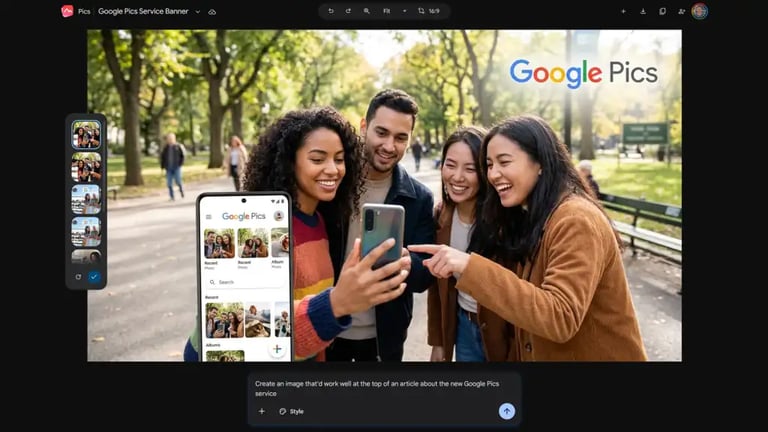

Generated images can be exported to a computer or copied to the clipboard, and there is a Docs-like image management path via docs.google.com/images for accessing edits and creations.
Pics enhances inside-docs visuals by offering integrated editing, generation, collaboration, and version history, while noting some usability quirks and limitations.
In Docs and Slides, users can edit images by selecting Edit this image with Pics, using a desktop-only editor that can apply multiple edits in a single batch (up to five requests) with real-time processing that finishes in seconds.
For image generation, users can access Pics generation at pics.new, which uses Gemini prompts and supports real-time collaborative editing among Google accounts with Pics access; however, only participants with full access can actively modify images.
Users can upload their own photos to use as references or elements within edits, and Pics is currently desktop-focused rather than available in mobile apps.
The generation interface offers multiple output options, a version history (via a hidden control), and a cropping tool that crops based on existing image content rather than resizing with new proportions, which can affect the final appearance.
Edits can include changing colors, modifying text inside images, altering backgrounds, and translating text within images, with the option to replace the image after edits are applied.
Google Pics is an integrated image editing and creation tool within Google Docs and Slides, designed to work inside the Drive ecosystem and available to users with Google plans such as Google AI Pro/Ultra or Business/Enterprise Workspace tiers.
Summary based on 1 source
Get a daily email with more Tech stories
Source

Computerworld • Nov 6, 2026
Google Pics: How to level up your visuals in Docs and Slides