Gradio Unveils gr.Workflow: Simplified AI Pipelines with Drag-and-Drop Graphs and One-Click Deployments
August 25, 2026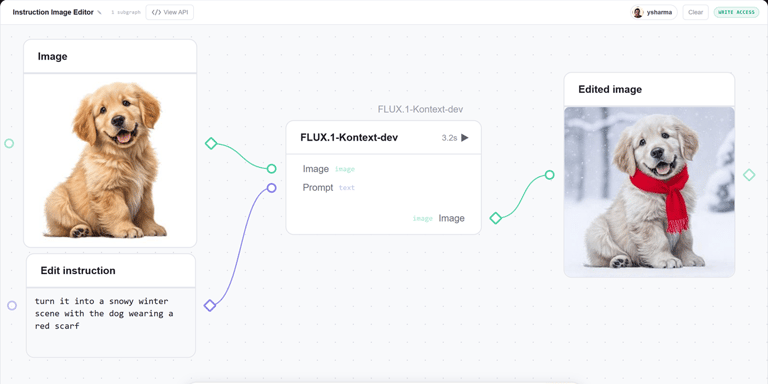

Gradio debuts gr.Workflow, a built-in tool to craft AI pipelines as runnable graphs with drag-and-drop interfaces, exposing intermediate results, REST API endpoints, and one-command deployments to Hugging Face Spaces.
The workflow supports a fan-out pattern, allowing one input to spur multiple parallel outputs by running several model calls and even generating LLM-driven titles in parallel.
Workflows assemble three node types—references (inputs), operators (processing steps), and subjects (outputs)—and can include Python functions, models on Inference Providers, other Spaces, or Dataset rows as nodes.
A data-focused example showcases a Hugging Face dataset with an overview card, sample rows, per-column statistics, and parallel-distributed distributions via the Datasets Server API.
Getting started is straightforward: duplicate a demo and rewrite it locally using gr.Workflow.bind with Python functions; the Gradio docs provide a full guide and best practices.
GPU-enabled runs are supported by tagging functions with @spaces.GPU, enabling ZeroGPU for GPU-bound execution inside Space without external GPU setup.
Live examples illustrate diverse capabilities, such as an image editor pipeline using Qwen-Image-Edit and a media studio graph that chains image generation, background removal, TTS, and LLM-generated episode titles, each with separate REST endpoints.
A teaser hints at building complex apps like AUTOMATIC1111 with gr.Workflow, with a forthcoming post detailing a step-by-step build.
Core mechanics: workflows are graphs of references, operators, and subjects; connections are created by dragging between ports, and results appear in place as steps execute.
Every workflow doubles as an API, with outputs exposed as REST endpoints callable from the Gradio client or via curl, enabling seamless code-to-API integration.
Summary based on 1 source
Get a daily email with more AI stories
Source

Hugging Face • Aug 25, 2026
Wire It, Run It, Deploy It: AI Workflows in Gradio