Microsoft Word Integrates ChatGPT for Seamless AI-Powered Writing and Editing
September 18, 2026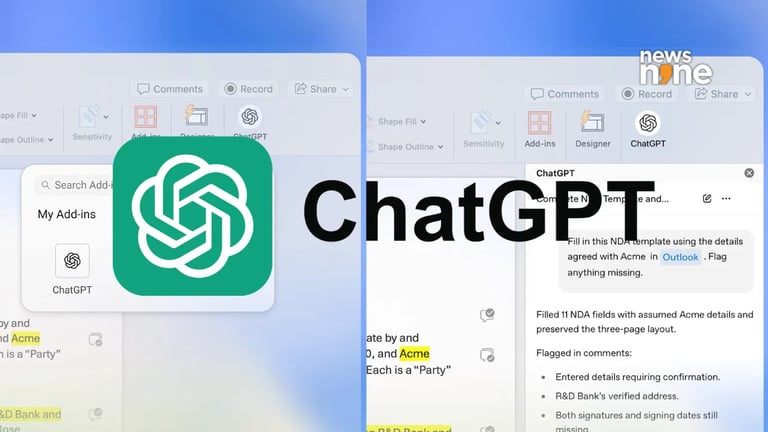

OpenAI’s ChatGPT add-in for Microsoft Word (and Excel and PowerPoint) lets you access AI features directly from the Word ribbon; install via the Microsoft Marketplace, sign in with a ChatGPT account, and it remains usable across all three apps without reinstallation.
To install, open Word, navigate to Home > Add-ins, search for the ChatGPT add-in published by OpenAI, add it, and sign in with your ChatGPT account.
Once installed, the add-in can be launched from a persistent sidebar and can be used while you work on your document, reducing the need to switch to a browser tab.
The tool supports rewriting, proofreading, tone adjustment, simplification, and formatting improvements for a wide range of professional writing tasks—from reports to emails to presentations.
AI-generated text should be human-reviewed to avoid factual errors or misinterpretations, with AI treated as an assistant rather than a replacement for the writer.
The add-in uses a token-based pricing model on the free plan, and Word adheres to API rate limits; extensive edits may consume tokens that could also apply to Code features.
The feature, announced in OpenAI’s release notes, enables drafting from notes, summarizing documents, revising selected text, and adjusting headings and formatting via a dedicated Word sidebar.
This integration reduces context switching by keeping AI assistance within Word, making it feel like a built-in productivity boost.
Word sessions’ AI memory doesn’t share history with the broader ChatGPT chats, and there’s no in-app plugin memory across sessions.
OpenAI cautions about potential formatting issues with complex elements and unintended content changes; users should back up documents before significant edits.
The add-in is published by OpenAI and is permitted to read from and modify documents and transmit data online, supporting text selection for rewrites and outlines.
The tool provides practical workflows for journalists and business users, enabling quick drafts, summaries, and edits directly inside Word.
Summary based on 3 sources
Get a daily email with more Tech stories
Sources

WinCentral • Sep 18, 2026
No More Copy-Pasting: ChatGPT Is Now Available Inside Microsoft Word
News9 LIVE • Sep 18, 2026
ChatGPT is now in Microsoft Word: Here’s how to install it and what it can do