Waveshare Launches PocketTerm35-Pi5: Handheld Linux Terminal with Raspberry Pi 5 for Portable Computing
April 12, 2026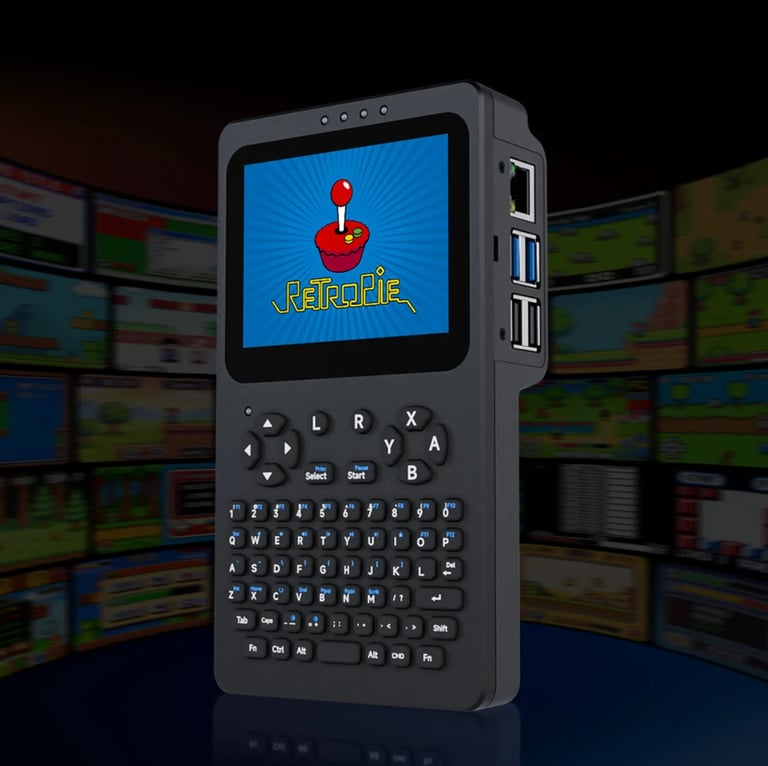

Waveshare unveils the PocketTerm35-Pi5, a handheld Linux terminal powered by Raspberry Pi 5, designed for portable command-line work with an integrated 3.5-inch display, keyboard, and battery.
The device targets developers and electronics enthusiasts seeking portable computing with productivity, DIY, and gaming capabilities, featuring a touchscreen and keyboard built into a compact handheld package.
A single, integrated enclosure combines a touchscreen, keyboard, and Raspberry Pi-friendly right-side I/O alongside a front USB-C power/charging port for easy operation on the go.
Connectivity and ports include USB, Gigabit Ethernet, USB-C charging, an I2C header, a 2-pin battery connector, and a 2W 8Ω speaker plus a 3.5mm audio jack, with a UPS-style power management system for seamless power switching.
Right-side I/O features Gigabit Ethernet and USB 3.0/2.0 ports, while the front adds the USB-C power port and 3.5mm audio jack with a power button for quick access.
Input is provided by a 67-key silicone keyboard with dedicated action keys and shortcuts, managed by an RP2040 MCU to handle keyboard input and system controls.
The chassis blends a CNC-machined aluminum front panel with a plastic rear housing, sized around 93.5 x 168.5 x 37 mm with ventilation for cooling.
Pricing starts at roughly $149, with configurations including variants with built-in Raspberry Pi boards, pre-installed storage, and accessory kits.
The article credits the original author and notes translator/editor contributions from Notebookcheck, with a publication date of today.
The display is a 3.5-inch IPS touchscreen at 640 x 480, with HDMI video output and a 3.5mm audio jack.
Core hardware includes a Raspberry Pi 5 (1GB variant in this model) and a pre-installed 64GB microSD card, plus an onboard RP2040 MCU for keyboard, brightness, and volume control.
An LED/status layout sits above the display, with a rear speaker grille and dedicated boot and reset buttons.
Summary based on 3 sources
Get a daily email with more Tech stories
Sources
LinuxGizmos.com • Apr 12, 2026
PocketTerm35-Pi5 Handheld Linux Terminal with Raspberry Pi 5 and 3.5″ Display
Notebookcheck • Apr 12, 2026
PocketTerm35: Handheld with touchscreen and keyboard comes with Raspberry Pi 5
Gizmochina • Apr 12, 2026
PocketTerm35 is a handheld Linux PC powered by Raspberry Pi 5